Working capture
Semester Calendar
CalendarLorevik
First-party working surface
AI side businesses · University student founders · Creator products
Build a Living Surface for study, work, or an AI-powered side business. Keep it useful with local routines, then publish the reusable product when it is ready.
Local creation and free publishing do not require a membership.
Own the files
Your vault is a plain folder. Open it, copy it, move it, or back it up.
Bring the agent
Connect Claude Code, Codex, or another local runtime. Lorevik is the surface, not the model.
Share the Surface
Prepare the reusable method and interface as a review-ready package, separate from the owner's working vault.
Inside the app
One persistent Lorevik window carries two real Living Surface captures through a Local Agent run, an illustrative Routine concept, a composed Morning Brief, and a review-ready marketplace package.
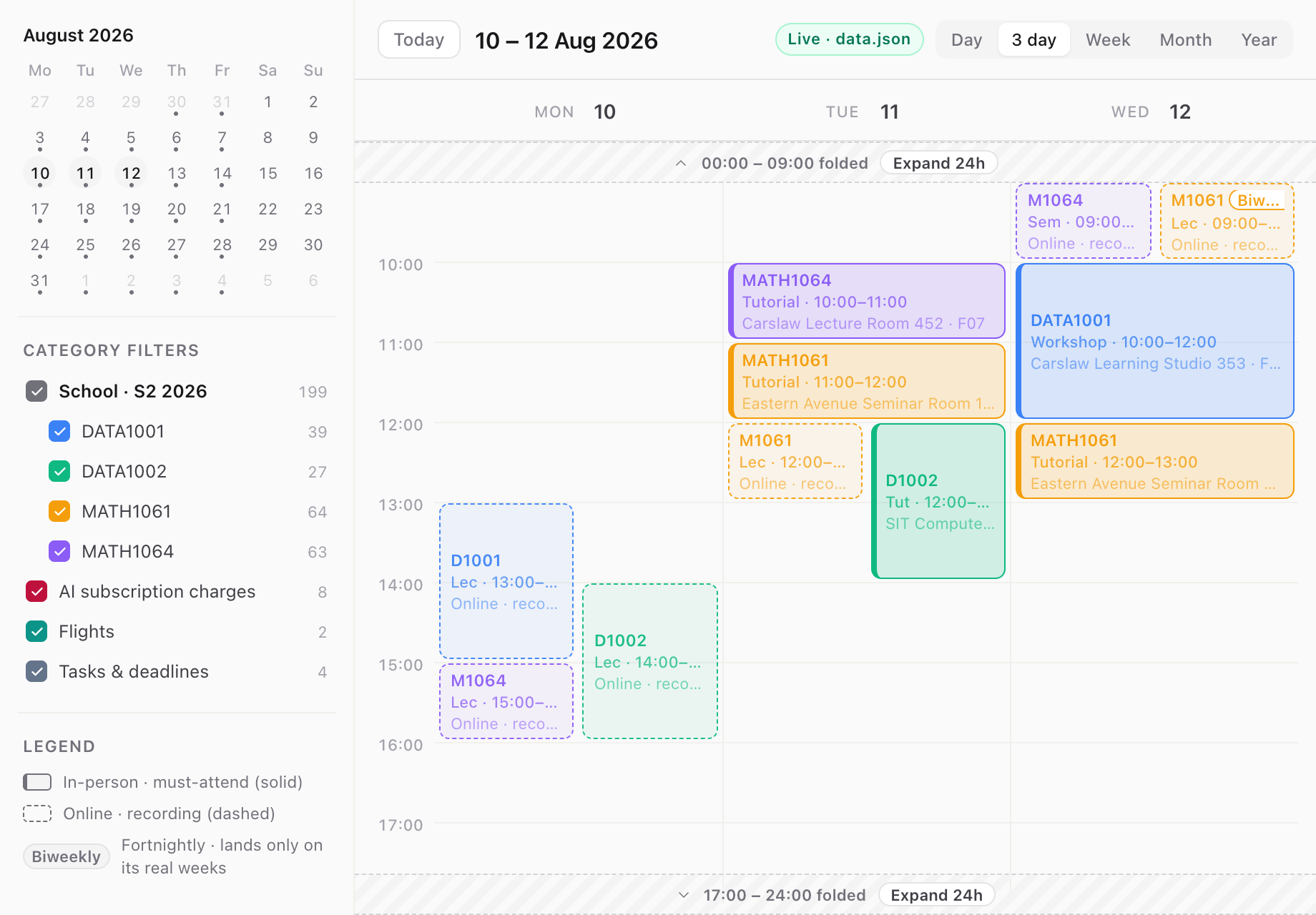
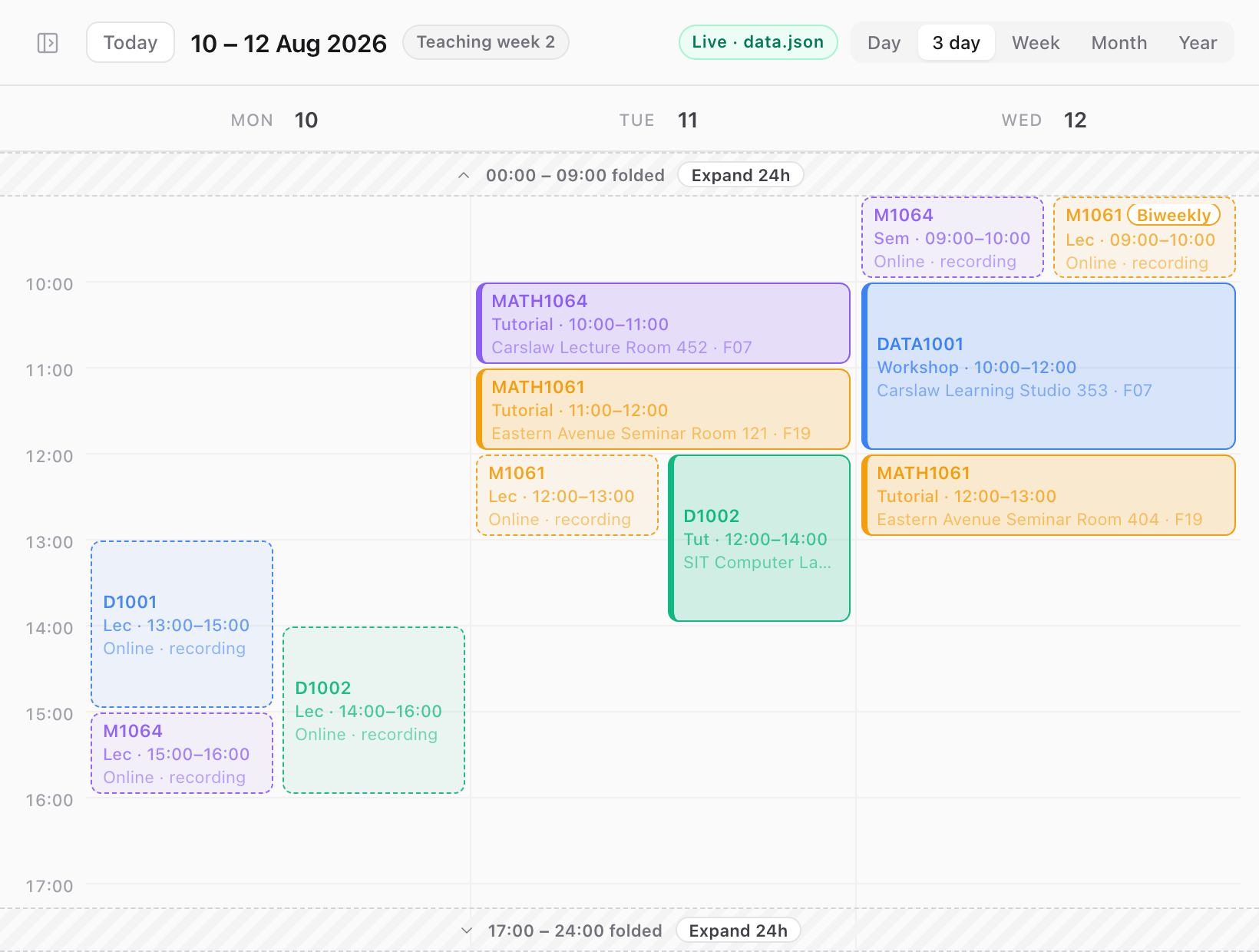
01 · Calendar - A scoped Local Agent fills a real Calendar Surface inside the workspace.
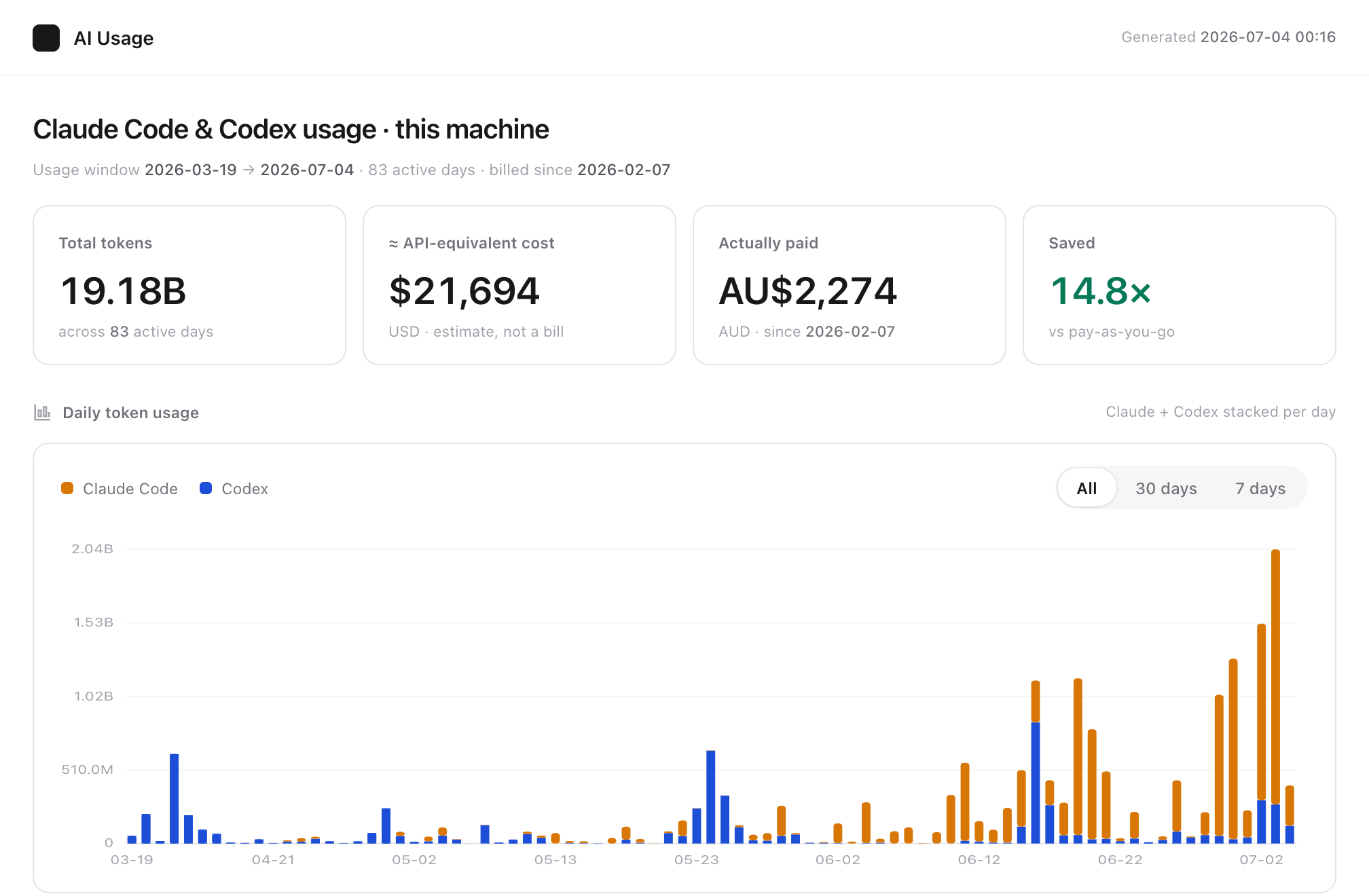
02 · AI Usage - Concept preview: a proposed 07:00 workflow would write local usage into a daily Surface.
03 · Morning Brief - Calendar and AI Usage pull out and dock into one board.
04 · Explore - The same review-ready package can move toward marketplace distribution.
This storyboard explores future mixed-source writes and cadences. Current Routines do not provide the calendar-to-AI-usage write, every-second-day timing, or Sunday-specific weekly timing shown below.
07:00
Daily
Every morning
01 · due routine
This future workflow would close the previous local usage window, combine approved calendar context, and write a day opening without another model call. That mixed-source write is not in the current runtime.
01 · Source
Local usage + calendar
Configured local files
02 · Run
Local bridge
Deterministic close and summary
03 · Write
ai-usage/data.json
Feeds Morning Brief
Day opening
ai-usage/data.json
Yesterday · usage window closed
Today · commitments gathered
Morning · first focus surfaced
07:00
Every 2 days
Every second day
02 · due routine
This future workflow would turn approved notes into a sourced brief and practice loop. Every-second-day timing at 07:00 is illustrative, not a current schedule type.
01 · Source
Approved research notes
Source links stay attached
02 · Run
Local agent
Source-bound synthesis
03 · Write
learning-brief/data.json
Feeds Morning Brief
Learning brief
learning-brief/data.json
Explain · one sourced concept
Practice · one small exercise
Review · next question queued
07:00
Weekly
Every Sunday
03 · due routine
This future workflow would group local publishing, audience, and support signals into one next move. Sunday-specific weekly timing is not a current schedule type.
01 · Source
Creator workspace
Publishing + support signals
02 · Run
Bridge + local agent
Groups signals, then drafts
03 · Write
creator-pulse/data.json
Feeds Morning Brief
Creator pulse
creator-pulse/data.json
Publish · queue reviewed
Listen · questions grouped
Decide · one next move framed
04 · Composed output
The day opening, learning brief, and creator pulse meet in one Surface while their source files and schedules stay distinct.
Architecture
Lorevik separates the runtime from the marketplace. Your vault, raw inputs, owner Data JSON, agent sessions, and routines stay on your machine by default. The web handles accounts, listings, submitted listing metadata, transactions, and explicit package delivery.
Desktop runtime
Private work happens here
Local vault
Plain files you can inspect, move, and back up.
Local bridge
Connects the visible Surface to the desktop runtime.
Your agent
Claude Code, Codex, or another compatible local runtime.
Living Surface
An interface filled with owner data on the owner's machine.
Routine closes the local loop
Refresh a Surface or reopen a saved board without turning the owner's workspace into a cloud job.
Explicit submit
Creator chooses the distribution package
Web control plane
Discovery, identity, and commerce
Accounts
Identity and creator profiles
Listings
Public descriptions and submitted listing metadata
Consent and audit
Records and hashes, not raw owner files
Commerce
Launch-gated transactions and bundle delivery
For the live workspace, cloud services receive submitted listing metadata, not raw owner vault contents. Marketplace publication is a separate, explicit path for a creator-submitted distribution bundle.
Buyer installs into a different local vaultImplemented
Local vault, bridge, Living Surface runtime, and routines
Launch-gated
Paid marketplace delivery and real-money direct charges
Not final
The full capability matrix and purchaser licence schedule
The website cannot silently reach into your vault or run your local agent.
Explore the full architectureHow it works
A local folder holds your data, your surfaces, and the context your agent needs. It's plain files — visible in Finder, yours to move or back up.
Browse the marketplace and download one into your vault. The smallest surface is a single instruction file; the rest can be generated on demand.
The AI agent you already run reads the surface and writes your real data into it through a local bridge. No placeholder numbers — if there's nothing yet, the surface says so.
Schedule or trigger the surface to refresh itself. That's the step that turns a dashboard into something that keeps working while you don't.
Follow the same clearly labelled student-founder example from a useful local workflow to a creator-owned package, marketplace distribution, direct sale, and a recurring operating channel. The product stays the same while the business layers grow around it.
Semester Command
Illustrative Learning Surface
Semester Command
Local-first Living Surface
Calendar
AI review
Brief
Useful local loop
Timetable + AI review + weekly brief
01 · Illustrative student project
Semester Command begins as a local workflow: Calendar keeps the timetable, an AI review explains model usage, and a weekly brief turns both into the next study block.
Course inputs
Living Surface
Study block
Semester Command
Illustrative Learning Surface
Semester Command
Local-first Living Surface
Calendar
AI review
Brief
Creator-owned package
Metadata, package boundary, review route
02 · Creator control
Creator Studio shows package metadata, listing state, and review readiness. Publishing begins here, while the private working vault stays outside the listing package.
Listing readiness
Creator StudioPackage boundary
Listing metadata
Review route
Semester Command
Illustrative Learning Surface
Semester Command
Local-first Living Surface
Calendar
AI review
Brief
Marketplace choice
Free listing or maintained paid listing
03 · Free or paid
Free publishing remains open without Creator Membership. A paid listing uses the Creator plan and the marketplace review path before checkout can open.
Free listing
No membership gatePublish the reusable package without charging a buyer.
Paid listing
Creator planSubmit a maintained product through the paid review path.
Semester Command
Illustrative Learning Surface
Semester Command
Local-first Living Surface
Calendar
AI review
Brief
Direct-charge sale
Buyer → creator as seller → platform fee
04 · Creator economy
The creator is the contractual seller and Merchant of Record. Lorevik receives the applicable platform fee while the creator owns the customer obligation for the product sale.
Direct-charge transaction
Buyer
Pays creator
Creator
Seller and MoR
Application fee branch
Lorevik · platform service
Semester Command
Illustrative Learning Surface
Semester Command
Local-first Living Surface
Calendar
AI review
Brief
Operating channel
Routine, support, refunds, opt-in signals
05 · Creator channel
Sales, refund conversations, installs, opt-in usage, and paid content belong in one creator operating view. That unified layer is deliberately shown as Planned until it is connected end to end.
Creator operations
Planned product layer
Creator channel
PlannedSales and refunds
PlannedOpt-in installs
PlannedOpt-in usage
PlannedThe marketplace
Working Lorevik captures sit beside one bundled learning sample and clearly marked concept directions. Every card separates product state, publisher identity, and public activity. Metrics appear only when real marketplace data exists.
A working timetable surface with rooms, overlaps, and alternating weeks handled in one view.
Lorevik
First-party working surface
Public activity
No public metrics
A working local view of Claude Code and Codex token usage with an explicit API-cost estimate.
Lorevik
First-party working surface
Public activity
No public metrics
Sample lesson
Agentic engineering
Evidence trail
SampleA bundled agentic-engineering sample turns source material into explanation, deliberate practice, review, and visible mastery evidence.
Lorevik sample
Bundled working sample
Public activity
No public metrics
Research
Ready
Build
In review
Approve
Human gate
A human-supervised agent console that carries a brief through research, build, review, and approval.
Illustrative creator
Concept identity, not a live seller
Public activity
No public metrics
Paper map
Connect claims, sources, figures, and discussion into a paper that can be inspected instead of only read.
Illustrative creator
Concept identity, not a live seller
Public activity
No public metrics
Channel
Sample shelf
No invented sales or audience metrics.
Organize free releases, subscriber material, and paid Living Surfaces without pretending sample activity is real.
Illustrative creator
Concept identity, not a live seller
Public activity
No public metrics
This gallery shows the range of the format. Published marketplace listings install locally and run against the owner's own data.
Browse published listingsWhat can become a Living Surface
A Living Surface can explain, teach, operate, track, or express. The common boundary is simple: it is an installable interface with a clear purpose, honest data paths, and an owner who decides what it can access.
Personal systems
Calendars, assets, travel plans, health logs, reading rooms, and daily briefs can live as interfaces over files you control.
Example forms
Updated by you or a local routine
For creators
A Living Surface is a new kind of digital asset: your workflow, your knowledge, and your judgment, packaged into something other people can install and run on their own data.
Creators publish surfaces and keep them alive by fixing, improving, and versioning the package. That maintenance is the point: a surface people trust is one someone stands behind.
Versioned package
Submit an exact package instead of exposing the rest of your vault.
Private paid delivery
Paid bundles stay behind purchase-bound access checks.
You are the seller
Creator sales route through your connected Stripe account.
Free listings stay free
A Creator membership is only required for paid listings.
Creator membership is A$29/month or A$290/year. Real-money checkout stays closed until launch review and go-live gates are complete.
Pricing
Local creation and free publishing do not require a membership. Listing a paid Living Surface requires the Creator plan, whose committed price comes from the same source used by checkout.
Browse the marketplace, install free surfaces, and run them with your own agent on your own machine.
List and maintain paid Living Surfaces as a creator. The annual option is A$290; real-money checkout remains behind the launch gates.
These are committed plan prices, not a live-checkout signal. Checkout opens only after the required launch review.
Where we are
We're not going to show you a wall of logos or invented testimonials. The current product already has a local vault, an agent-facing workspace, installable Living Surfaces, and a marketplace path. Publishing and real-money checkout remain behind explicit launch gates until their review requirements are complete.
No vanity metrics here. Product state is stated directly.
Questions
Install your first Living Surface, or publish one of your own.
Not ready yet? Join the waitlist instead.